Ideas into
working systems.
I’m Cyrus Gerard, an MPhys Astrophysics student at the University of Edinburgh, currently on exchange at NTU Singapore. I’m looking for a summer 2027 internship in physics, computational astrophysics, AI or a technology startup.
EXPLORETHE WORK↘
From Edinburgh
to Singapore.
I’m studying astrophysics and developing an interest in computational methods for scientific research.
2024–2029 · Degree expected May 2029
University of Edinburgh
MPhys Astrophysics
August 2026–May 2027 · Exchange
Nanyang Technological University
Singapore
2024/25 · University of Edinburgh
Certificate of Merit
Physics and Astronomy, Year 1
Selected Edinburgh results
- Linear Algebra and Several Variable Calculus 86%
- The Dark Universe 77%
- Dynamics and Vector Calculus 76%
- Modern Physics 75%
Source · University of Edinburgh academic record
Coursework
- Edinburgh
- Astrophysics and Astrobiology, The Dark Universe, Modern Physics, Dynamics and Vector Calculus, Programming and Data Analysis.
- NTU Singapore
- Electromagnetism, Quantum Mechanics II, Thermal Physics and Probability.
Skills & languages
- Physics & mathematics
- Astrophysics, mechanics, electromagnetism, quantum mechanics, probability and vector calculus through university coursework.
- Programming
- Beginner Python. Completed Programming and Data Analysis at Edinburgh.
- Product work
- Framing workflows and requirements, prioritising features and giving usability feedback.
- Languages
- French and English (fluent). Spanish (intermediate).
Explore the work.
Try the demos.
Explore seven application walkthroughs and try interactive samples. I define requirements, prioritise features and give usability feedback, and use AI coding tools to help build the projects.
One place.
Every currency.
Gringotts brings transactions, currencies and supported Apple Shortcuts captures into one financial workspace.
MY CONTRIBUTION
I framed the need for a single place to track spending and accounts across currencies.
From budget to reimbursement
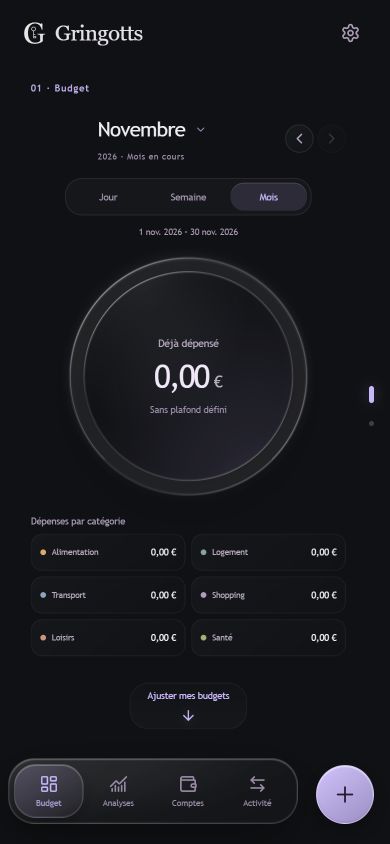
The mobile budget shows spending by category and lets you switch between day, week and month.
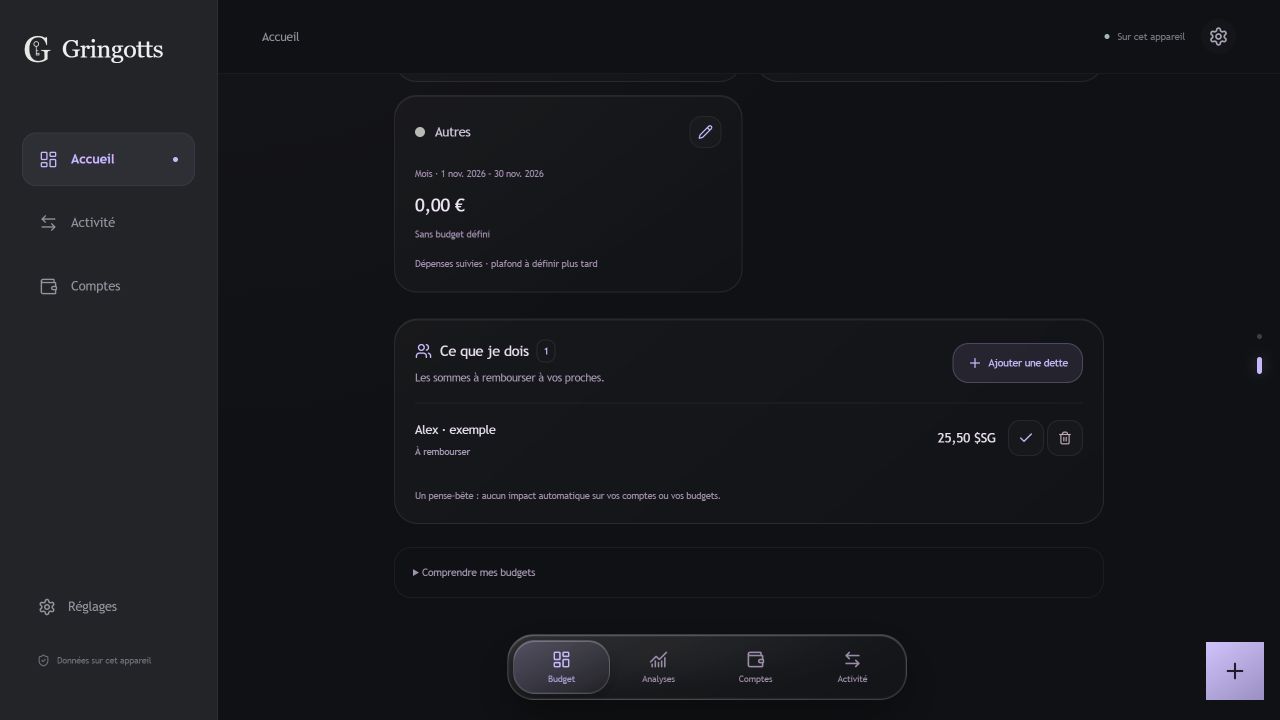
A desktop example shows how a reimbursement can be tracked alongside a budget without changing it.
Try the interactive sample
A little more clarity.
Recent activity
SYNTHETIC DATATwo versions. One decision.
What happens when the cloud changes while you are editing?
Local base revision: 4. This sample executes the project's synchronization decision logic.
Read the actual source src/cloud-model.ts
export function planSync(local, remoteRevision) {
  if (remoteRevision === null)
    return local.hasData ? 'push' : 'empty';
  if (!local.hasData) return 'pull';
  if (local.dirty)
    return local.remoteRevision === remoteRevision
      ? 'push' : 'conflict';
  return local.remoteRevision === remoteRevision
    ? 'idle' : 'pull';
}
Actual function logic, reformatted with TypeScript annotations omitted for readability. No credentials or user data.
A shared plan.
Clear control.
BAT combines personal task management with user connections, invitations and permission-aware sharing.
MY CONTRIBUTION
My role centred on the task and sharing workflows. The case study describes the project implementation.
Organise a week and share a calendar
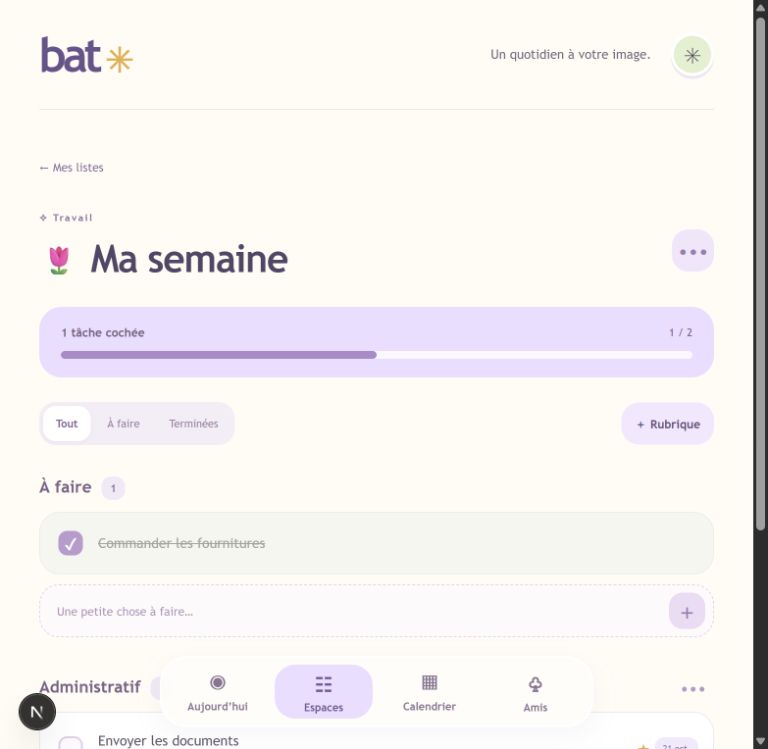
A weekly list groups tasks into sections and shows progress as items are checked off.
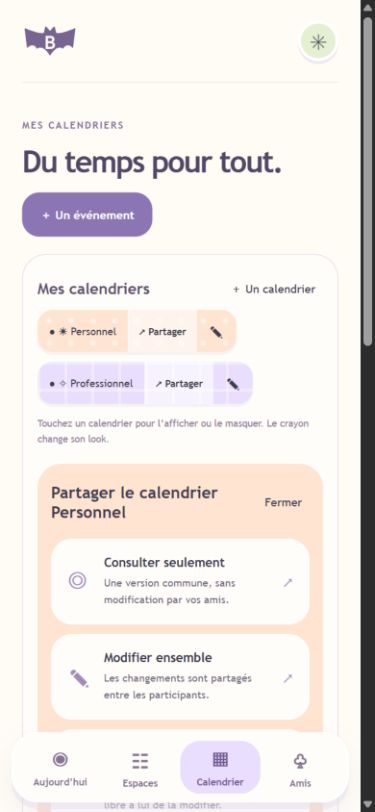
When sharing a calendar, choose whether someone can view it or edit it with you.
Try the interactive sample
Make room for progress.
To do 2
Refine the landing page
A clear first impression.
Connect the form API
Validate inputs and errors.
In progress 1
Check the mobile flow
Small screens. Same clarity.
Done 1
Define the first milestone
Scope agreed.
A copy needs its own identity.
When shared content is copied, identifiers must change together. Otherwise, a task can point to the wrong section.
section: s1
task.sectionId: s1section: s2
task.sectionId: s2The same mapping preserves the relationship.
Read the actual source src/lib/sharing.ts
const sections = new Map(
  list.sections.map(s => [s.id, makeId()])
);

sections: list.sections.map(s => ({
  ...s, id: sections.get(s.id)!
})),
tasks: list.tasks.map(task => ({
  ...task, id: makeId(),
  sectionId: task.sectionId
    ? sections.get(task.sectionId)! : null
}))
Excerpt from importShare, reformatted. The full implementation also remaps lists and spaces and validates the result.
Less scattered.
More actionable.
Cerebro brings agenda, priorities and information from several sources into one personal workspace. The sample below shows the earlier message-to-review workflow.
MY CONTRIBUTION
I set the direction for a mobile-first daily overview, with actions and agenda changes available for review.
Decide what deserves attention
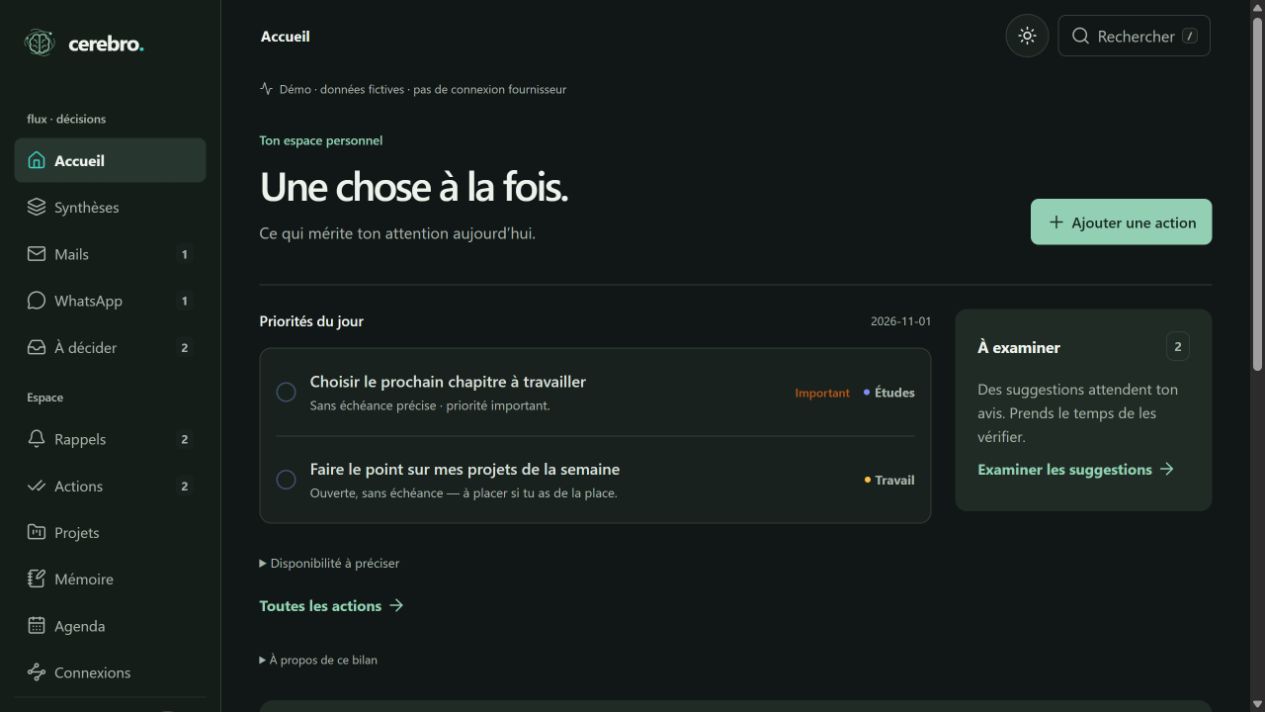
The Today view brings together priority actions and suggestions that still need a decision.

The mobile view keeps the same priorities while bringing mail and pending decisions into its navigation.
Try the interactive sample
A signal in the noise.
Local rule-based extraction, adapted from the prototype. No AI model, mailbox access or external call.
Know what changed.
The prototype fingerprints message content to help recognize the version being processed. It also retains evidence and explicit operation states.
Read the actual source backend/mail-processing.cjs
const { createHash } = require('node:crypto');
const hash = s => createHash('sha256')
  .update(s).digest('hex');

const fingerprint = m => hash(
  [m.subject, m.text || m.snippet || '']
    .join('\n')
);
Actual source excerpt, reformatted. This excerpt comes from the earlier rule-based message analysis.
Animus / Professional workflows
Working prototypeStart with the
next action.
Case follow-ups, meetings and communications can be scattered across different tools. A daily workspace brings priorities, deadlines and case follow-ups together for a professional workflow.
MY CONTRIBUTION
I defined which case and communications workflows to cover, and set priorities for the daily view and mobile experience.
From the daily view to the case file
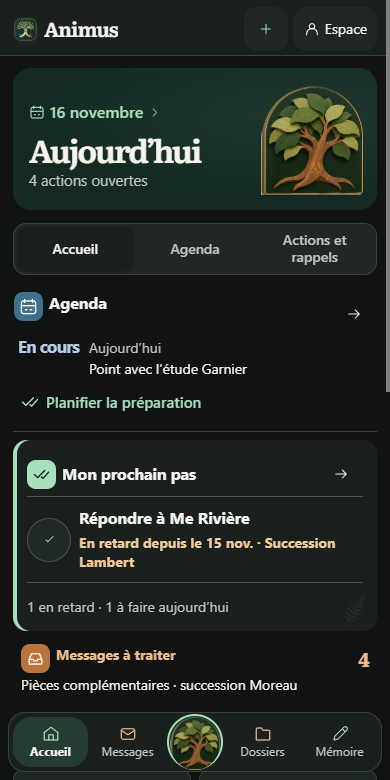
The daily workspace surfaces the agenda, the next action and messages to review.
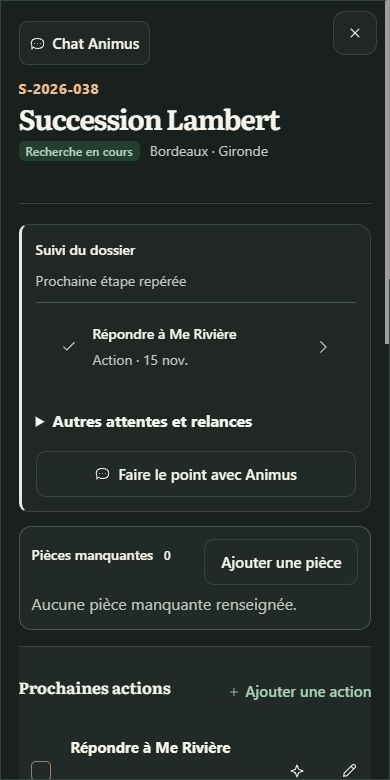
A fictional case shows follow-ups, missing documents and the next action in one place.
Yggdrasil / AI orchestration
Local prototypeOne project.
Shared context.
Context can disappear when a task moves between AI coding tools or when a question interrupts ongoing work. A local workspace keeps tasks, conversations and handoffs associated with the right project.
MY CONTRIBUTION
I specified separate workflows for questions and tasks, and asked for a per-project view of progress and handoffs.
A mission moves from one agent to the next
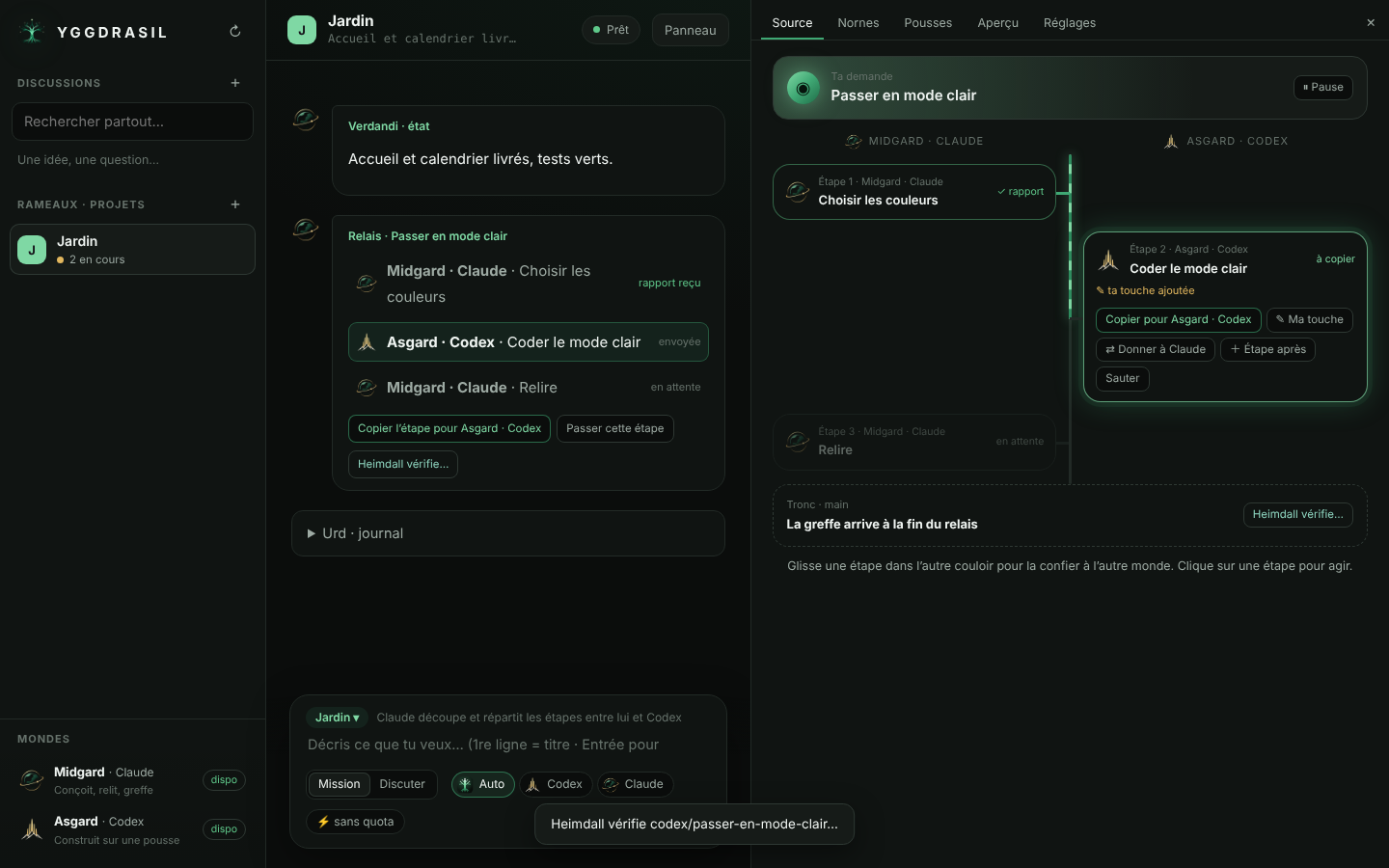
The sample mission splits a light-mode change into design, implementation and review across Claude and Codex.

The composer keeps discussions and missions separate, with a choice of agent for the next step.
Explore the workflow
Illustrated workflow
Define a task
Write the expected outcome and the context the next agent needs.
Track the work
Keep progress and questions in the same project without turning each question into a new task.
Carry context forward
Pass along the completed work, open decisions and the next action.
Ranoa / Learning tools
Prototype in developmentKnow what to
practise next.
Knowing the deadline and having the course notes still leaves the question of what to practise today. Ranoa brings course material, revision sessions and planning into the same workspace.
MY CONTRIBUTION
I defined the active-practice workflow and chose a planning model where students can accept, edit or decline suggested changes.
Turn course material into a study objective
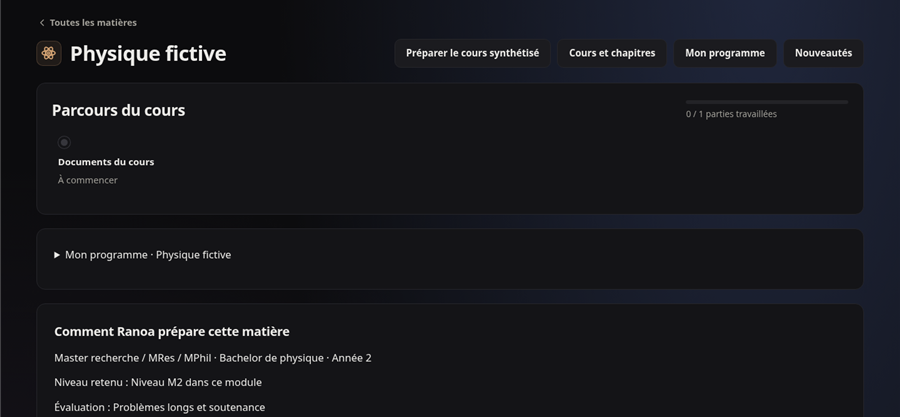
A fictional physics course shows progress and entry points for materials and planning.
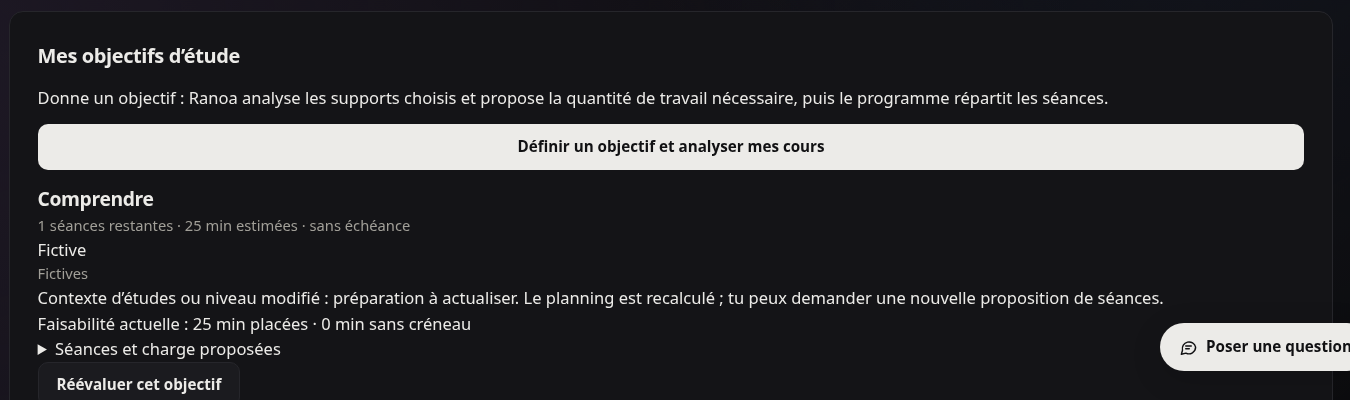
A sample study objective shows the estimated work remaining and whether a session fits the schedule.
Agamotto / Research tools
Deployment reportedGive each paper
a next step.
Paper discovery, reading notes and citation exports often end up in separate tools. Agamotto brings discovery, reading queues, notes and citation exports into one research workspace.
MY CONTRIBUTION
I set the product direction around discovering papers, reading them and following up on research questions.
Go from the catalogue to a paper’s equations
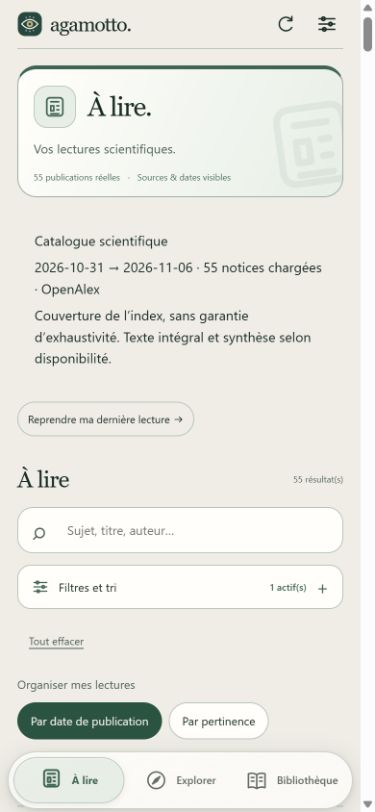
The mobile scientific catalogue shows where its records come from and offers search and sorting.
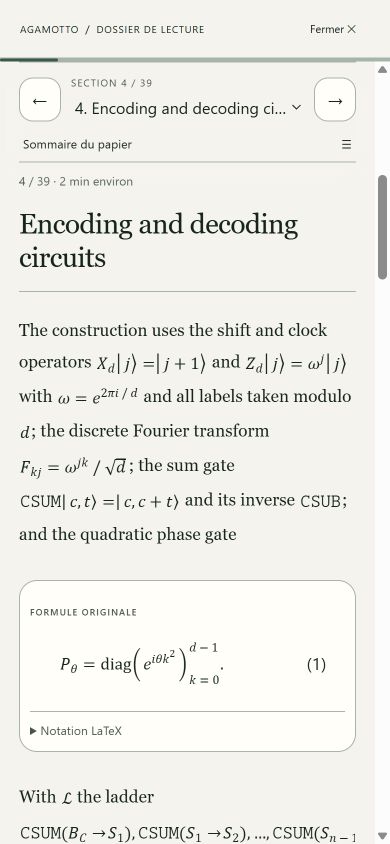
The reader shows a paper section, its rendered equations and an option to inspect the original LaTeX.
Explore the workflow
Illustrated workflow
Find a relevant paper
Start with a research question and decide which sources are worth opening.
Capture a useful note
Keep the question or idea you want to revisit alongside the reference.
Carry the reference forward
Export citation information for use in a bibliography.
Hydrazil / Interface design
Interface iterationHydrazil.
Interface work.
Interface improvements are in progress. Project scope and implementation details are pending confirmation.
MY CONTRIBUTION
I set the priority to improve the interface.
Let’s talk.
Research groups and technology teams
S2725468@ed.ac.uk